About The Project
Lambda Seed Project is a User Data Management System Build with AWS Lambda using NodeJs This is currently built using serverless framework and Sequelize ORM for connecting MySQL database and we are using AWS SECRETS MANAGER for storing all sensitive data and bitbucket pipelines for build and deploy the project in build time we are fetching all secrets and pass as environment veritable for lambda.
The system has followed a layered architecture so as to make it modular and to make it as loosely coupled as possible which means that the database can be changed from MySQL to PostgreSQL with almost negligible effort. Then again if the db schema needs to be changed or if a NoSQL database is to be adopted, we need make changes only in the repository layer, i.e the layer that directly communicates with the database. The service layer which contains the logic would still be intact.
Technology Stacks and Prerequisites
Technology Stacks
The system is built using NodeJs and AWS Lambda.We are using Serverless framework for developing lambda project and Sequelize ORM for connecting MySQL database and using Aws Secrets Manager for storing all sensitive data and bitbucket pipelines for build and deploy the project in build time we are fetching all secrets and pass as environment veritable for lambda this way all confidential data link database password username are passed to the code without explicitly setting up environments veritable only place we need to edit environment veritable is Aws Secrets Manager.
Prerequisites
-
VS Code (Preferred IDE)
-
Serverless Framework (CLI)
-
MySQL (Database)
Project Architecture
Technology Stack
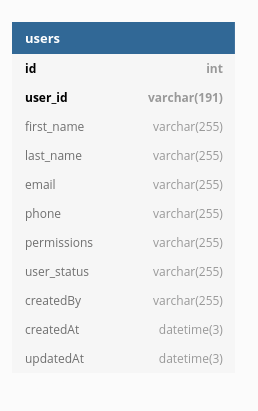
DB Structure
Tables and Configuration
| Parameters | Required | Value | Unique |
|---|---|---|---|
first_name |
required |
String |
false |
last_name |
optional |
String |
false |
required |
String |
true |
|
phone |
optional |
String |
false |
permissions |
optional |
String |
false |
user_status |
optional |
String |
false |
createdBy |
optional |
String |
false |
ER Diagram
Local Environment Setup
DB Migration Script
To recreate database faster flow steps
-
Update src/config/config.json file acceding to your MySql credentials
-
To create a database npm run db:create (Create a database name will be fled will be database on config.json )
-
To migrate database npm run db:migrate (Migrate database)
-
To Reset or do it in one setup npm run db:drop:create:migrate (This will drop database if already exit and crete and migrate in one step)
Code Setup
-
To clone dev branch git clone git@bitbucket.org:emvigotechnologies/lambda-seed-project.git -b dev
-
cd lambda-seed-project
-
For install dependencies npm install
run development server
We can run locally using serverless offline but we are unaging aws secrete manager to store all secrets become of this the server will not work locally because we are not passing credential and setup locally.
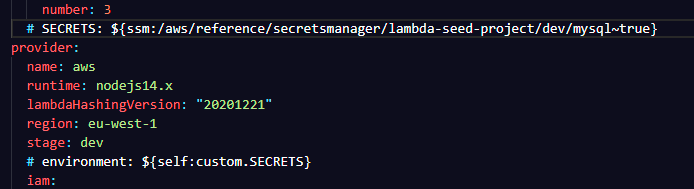
So we have two options first setup serverless but we not need any env data from secret manger for local development so to run locally comment out tow lines in serverless.yml but don’t forget to uncomment lines before commit else code will brake
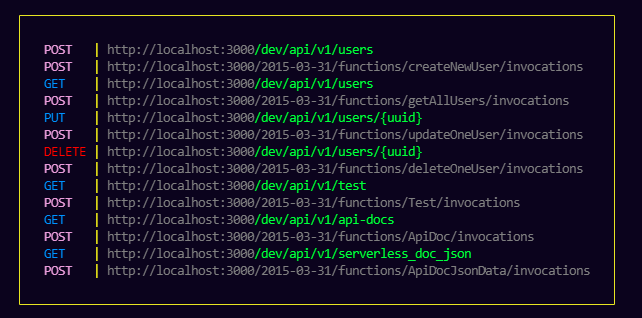
To Start Server run npm run dev
-
serverless config credentials --provider aws --key ${AWS_ACCESS_KEY_ID} --secret ${AWS_SECRET_ACCESS_KEY}
-
comment out following lines
-
SECRETS: ${ssm:/aws/reference/secretsmanager/lambda-seed-project/dev/mysql~true}
-
environment: ${self:custom.SECRETS}
-
How to find logs
-
We are using AWS cloudwatch service for monitoring logs.
-
In Local we can see the log in terminal by running npm run dev
Masking Data
We are using https://www.npmjs.com/package/maskdata[maskdata] to mask data in logs.using tha package we can masking the following data.
       fields: [
                "user_id",
                "first_name",
                "last_name",
                "email",
                "phone",
                "permissions",
                "createdAt",
                "updatedAt",
                "user_status",
                "createdBy",
            ],
Repositories
-
Bitbucket : lambda-seed-project
Packages Details
Third Party dependencies
-
Mysql2 is a continuation of MySQL-Native. Protocol parser code was rewritten from scratch and api changed to match popular mysqljs/mysql. MySQL2 team is working together with mysqljs/mysql team to factor out shared code and move it under mysqljs organization.
-
Maskdata is a Node.js module to mask various kinds of data. With the help of maskdata, you can mask email, phone number, card number, JSON fields, password etc.. Also, it provides utility methods to get a field, or replace a field from any complex/nested json
-
Winston Winston allows you to implement multiple logging transports, we are using this package for log level management
Development Dependencies
-
sequelize-cli is Sequelize Command Line Interface (CLI)
-
Serverless Framework : Build applications on AWS Lambda and other next-gen cloud services, that auto-scale and only charge you when they run. This lowers the total cost of running and operating your apps, enabling you to build more and manage less. The Serverless Framework is a command-line tool that uses easy and approachable YAML syntax to deploy both your code and cloud infrastructure needed to make tons of serverless application use-cases. It’s a multi-language framework that supports Node.js, Typescript, Python, Go, Java, and more. It’s also completely extensible via over 1,000 plugins that can add more serverless use-cases and workflows to the Framework.
-
Serverless Offline plugin emulates AWS λ and API Gateway on your local machine to speed up your development cycles. To do so, it starts an HTTP server that handles the request’s lifecycle like API does and invokes your handlers.
-
Serverless Prune Plugin : The Serverless Framework does not purge previous versions of functions from AWS, so the number of deployed versions can grow out of hand rather quickly. This plugin allows pruning of all but the most recent version(s) of managed functions from AWS. This plugin is compatible with Serverless 1.x and higher.
-
Prettier :is an opinionated code formatter. It enforces a consistent style by parsing your code and re-printing it with its own rules that take the maximum line length into account, wrapping code when necessary. We are include this package for format code by running npm run format you can also use vscode Prettier extension instead.
-
Postman To Openapi : Will Convert Postman Collection v2.1/v2.0 to OpenAPI v3.0.
-
yaml convert : Command-line utility for converting between YAML and JSON, using yaml. By default parses either YAML or JSON from standard input and outputs JSON on standard output.
-
asciidoctor :This project uses Opal to transpile or, a modern implementation of from Ruby to JavaScript to produce asciidoctor.js. The asciidoctor.js script can be run on any JavaScript platform, including Node.js, GraalVM and, of course, a web browser. We are using this package for convert index.adoc file to index.html file
Git Hooks and commit helper
Git hooks are scripts that run automatically every time a particular event occurs in a Git repository. They let you customize Git’s internal behavior and trigger customizable actions at key points in the development life cycle.
-
Husky : Modern native Git hooks made easy
-
@commitlint/cli : commitlint checks if your commit messages meet the conventional commit format.this will standardize commit messages.
This is impose rules like
-
feat: This type is used if you are committing a code that is used to develop a feature. For example, implementing a camera is a part of the image capture of the user feature.
-
fix: This type is used when your commit is used to fix issues.
-
style: This is used when your commit code is deals with style updates
-
refactor: This is used when your committed code deals with refactoring your code for better readability.
-
doc: This is used when you have created or updated docs in your project. It can be a simple readme file or comments for better understanding. (But I highly recommend you to give comments when you are coding the feature).
-
chore: This is used when changing something on your project for better maintainability of the project. Like splitting functions or making services or changing file structure.
-
Commitizen When you commit with Commitizen, will help to generate a commit message without remembering the type of commit
-
cz-conventional-changelog : This a helper for Commitizen
-
standard-version Automate versioning and CHANGELOG generation
Git Hook Setup
-
npm install --save-dev commitizen @commitlint/config-conventional @commitlint/cli husky cz-conventional-changelog standard-version
-
npx husky install
-
npx husky add .husky/commit-msg "npx commitlint --edit $1"
-
Create .commitlintrc.json and .czrc file with following date
-
Update package.json
-
Rur npm run commit ot git cz
.commitlintrc.json
{
    "extends" : ["@commitlint/config-conventional"]
}
.czrc
{
  "path": "cz-conventional-changelog"
}
package.json
  "scripts": {
    "commit": "cz",
    "prepare": "husky install",
    "release": "standard-version"
  },
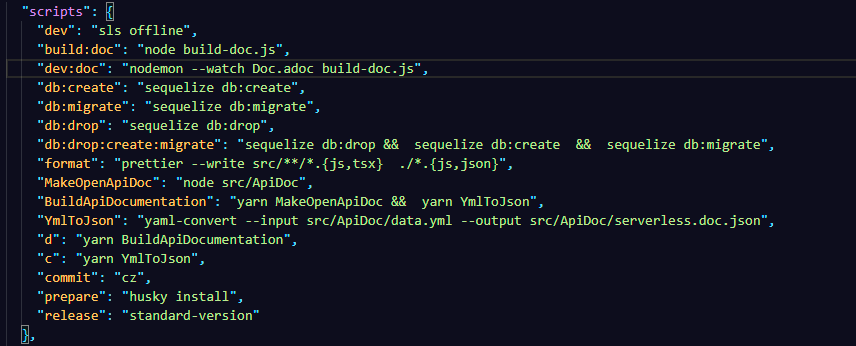
Development Commands & Details
-
dev
-
build:doc
-
dev:doc
-
db:create
-
db:migrate
-
db:drop
-
db:drop:create:migrate
-
commit
-
prepare
-
release
-
MakeOpenApiDoc
-
BuildApiDocumentation
-
YmlToJson
-
format
Details
-
dev : To start offline development server for lambda
-
build:doc : build index.html from index.adoc
-
Database Operations
-
dev:doc : live build index.html we can use to develope * db:create : Create Database
-
db:migrate : Migrate database
-
db:drop : Drop database
-
db:drop:create:migrate : Drop database are crete and migrate database
-
-
GIt Hook
-
prepare : setup git hook
-
commit : Build a commit message
-
release : Automate versioning and CHANGELOG generation
-
-
Build Api Documentation
-
MakeOpenApiDoc : postman api documentation to openapi src/ApiDoc/api.json to src/ApiDoc/data.yml
-
YmlToJson: convert data.yml file to serverless.doc.json
-
BuildApiDocumentation : MakeOpenApiDoc and YmlToJson at the same time
-
-
format : We are include this package for format code by running npm run format you can also use vscode Prettier extension instead.
Secret Manager Integration
In this project we are using AWS Secret Manager to store configuration data. for that we will configure aver secret manager detailers in serverless.yml file in custom properties we pass aver secret location as SECRETS then it is using in environment file. == API Documentation
API Documentation
API Details
-
Create New User
-
url : /users
-
method :POST
-
-
Get ALL Users
-
url : /users
-
method : GET
-
-
Update Users
-
url : /user/{user_id}
-
method : PUT
-
-
Delete User
-
url : /user/{user_id}
-
method : DELETE
-
API Version Details
For api versioning we are we are urls /api/v1/ starting for next version we are urls /api/v2/
Standard Request & Response
"Follow the below structure
Request Body
{
        "firstName": "Sanu",
        "middleName": ",
        "lastName": "Sudhakaran",
        "email": "sanu.sudhakaran@emvigotech.com"
}
Success Response Body
  {
    "status": "SUCCESS",
    "data": {
      "requestParameter": { // Optional
        "firstName": "Sanu",
        "middleName": ",
        "lastName": "Sudhakaran",
        "email": "sanu.sudhakaran@emvigotech.com"
      },
      "responseParameter": {
        "userId": "c1d3a112-c736-479a-812b-a1da6432b7d1"
      }
    },
    "timestamp": "2021-05-28T07:45:45+00:00"
  }
Business Failed Error Response Body
  {
    "status": "FAILED",
    "error": {
      "code": "APP404",
      "message": "Resource not found"
    },
    "timestamp": "2021-05-28T07:45:45+00:00"
  }
Error Response Body
  {
    "status": "Error",
    "error": {
      "code": "500",
      "message": "Internal Server Error",
      "target": "query", // Do not mention the sensitive data related the database or third-party API. Can be treat it as optional
      "details": [
        {
          "code": "301",
          "target": "$search",
          "message": "$search query option not supported"
        }
      ]
    },
    "timestamp": "2021-05-28T07:45:45+00:00"
}Build API Doc with postman
-
Save postman doc file
-
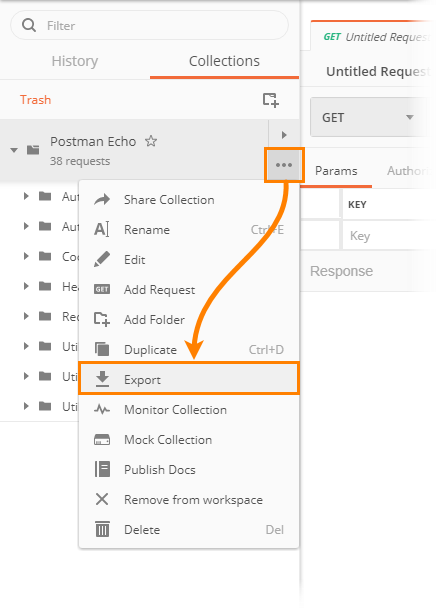
Click the ellipsis button (…) next to your collection and select Export.
-
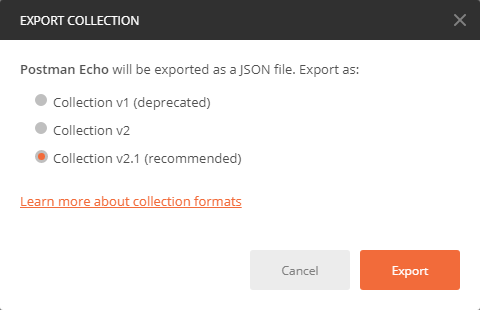
Select version to which you want to export the collection and click Export.
-
Select the location you want to save the collection to and click Save.
-
Sava and replace src/ApiDoc/api.json
-
-
Convert This Json file to openapi yml file for that run npn run MakeOpenApiDoc
-
src/ApiDoc/data.yml update this file according to swaged documentation stated you can reference src/ApiDoc/apiDocFinal.yml file this is the currant documentation yml file
-
Finlay we need to convert this yml file to json for swagger documentation although we can use yml also for simplicity we are using json for that we need to run npm run YmlToJson this will generate src/ApiDoc/serverless.doc.json file
How to create Ascii Document
To create ascii document there are several methods but using asciidoctor npm package. To use we install the package and write a smile code to convert the asciidoc to html file src/Asciidoc/index.js(code for conversion) src/Asciidoc/index.adoc (asciidoc file) to src/Asciidoc/index.html (output html file). for development we are monitoring the change in in the asciidoc file file using nodemon this will create html file whenever the asciidoc changes. to start nodemon run npm run dev:doc for only build the documentation run npm run build:doc. you can also use vs code extension also for development. but to crete the documentation we need to use asciidoctor npm package. or any online tool like to convert asciidoc to html file.
Constants
We are using constants for all the configuration data. this way we can change the configuration data in one place and we can easily change the configuration data in future.